
Attributes usage and constrains
iTop proposes out of the box different types of Attribute. Also we would love that every attribute could be used anywhere, anytime, it's not the case. So here we will mention the limitations and alternatives when there are some.
Field overwrite on child
A field is defined on a single class, with its properties: default value, allowed values (filter / values / regexp), mandatory (null_allowed), field dependencies,…
On each child class, you can define:
-
Overwrite its label and tooltip, they can be different on each sub-classes
-
If the field is not mandatory in its definition, then make it mandatory in the UI only for this sub-class with some PHP code
If
ExternalField is declared on a child class of the
class owning the ExternalKey,Then opening a child object using that
ExternalField
in its friendlyname definition will generate a fatal errorConstrains with mandatory field
Flags on lifecycle, overwrite of methods or callback on EVENT, none of this will work.
Only solution is to change the field definition!
Then the creation of child object will fail
If you have existing objects in your iTop with that field empty (including archived objects)
Then the Setup will fail!
Some Attribute types cannot be set as mandatory as part of their definition:
-
Attribute LinkedSet workaround: force an AttributeLinkedSet to be mandatory
-
Attribute Caselog: only works for the first entry, then it is no more empty.
Changing Attribute Type
If you change the type of an attribute, while multiple objects exists in your iTop, this is not a bulletproof operation, it depends on mysql/mariaDB capabilities:
-
For example, increasing the size of a Text field is supported but can be time consuming during the Setup, while the database column type is changed.
-
The opposite, reducing the size of a Text field can lead to data corruption, if a multi-bytes character is truncated in the middle
-
Changing a Date in DateTime: the time part will be set to 00:00:00
-
Changing a DateTime in Date: will the time part be reset to 00:00:00 (or kept in case of revert change ???)
-
Changing a Text to HTML: ??? → Instead of doing this, you can just add a <format>html</format> XML tag to the
AttributeTextfield definition.
-
Changing a Duration, Integer, Decimal, Date or Datetime into String: Ok ???
-
Changing a String into Duration, Integer, Decimal, Date or Datetime: can it ever work, assuming the data are clear ???
-
Changing an AttributeLinkedSetIndirect into a AttributeLinkedSet, has no effect on the database and can be revert without any damages. It only changes iTop behavior, so just test.
1) Create a new field and CSV export old field values,
2) Then import those values in the newly created field
3) Remove the old field from class definition
Portal limitations
Some attribute types are not editable in the Portal 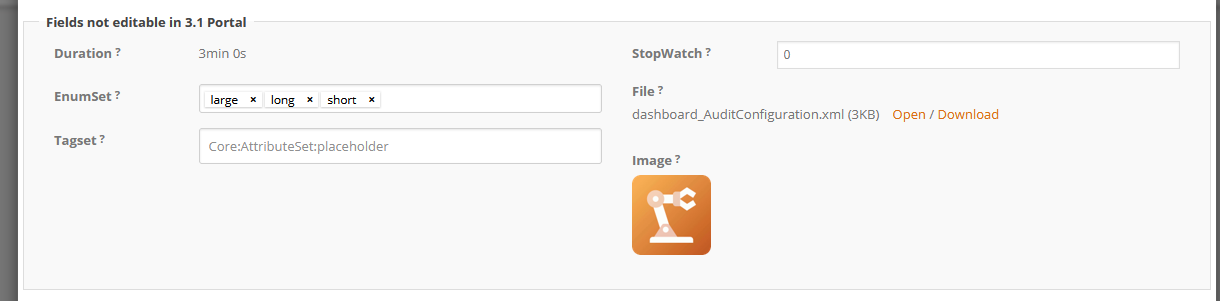
-
EnumSet and TagSet
-
File and Image
-
Duration
See this page for more Portal limitations
Attributes on relationships
When creating a link class, be aware that this
type of class does not support every type of
fields. Also it seems obvious for multiple, some are more
like a current (3.1.0 and below) iTop limitation.
Unsupported fields:
-
Caselog
-
LinkedSet, LinkedSetIndirect
-
Text, HTML, Template,
-
File, Image
-
Duration
-
TagSet, EnumSet
Context in which it will fail
-
In portal: edition of Links having those attributes will always fail
-
In console, while editing the host object: edition of links having those attributes will always fail (deny edition with host in the AttributeLinkedSetIndirect, flag edit_when)
-
In console, while reading the host object: edition of Links in pop-up supports most attributes but File & Image
Portal ManageBrick
If you display within a ManageBrick a LinkedSetAttribute, this will generate an error:
DataTables warning: table id=table-UserRequest - Ajax error. For more information about this error, please see https://datatables.net/tn/7
Which attribute to use
Some Attribute types seems similar:
-
TagSet,EnumSetorLinkedSetIndirect: Those three types of attribute allow to set multiple values to a single object field, chosen amongst a set of predefined allowed values. -
EnumorExternalKey(to a Typology subclass): Those two types of attribute allow to choose a single value amongst a set of predefined allowed values
Using one or the other has pros and cons:
Datamodel values
Allowed values are part of the Datamodel for an
Enum and EnumSet :
-
Cons: Adding an new allowed value requires a Designer MTP or a new extension version plus a Setup.
-
Pros: An OQL filter can be based on those values, they exists regardless of the iTop instance using this Datamodel
Database values
Allowed values for Typology,TagSet and
LinkedSetIndirect are data defined on each
iTop instances
-
Pros: Adding a value is quick and simple
-
Cons: Business rules coded in PHP and based on those values, introduce Data and Datamodel coupling which is documented nowhere and prevent troubleshooting your iTop Datamodel on an instance without your own data.
Searching for objects having a given Tag, can be done in the standard search, with a criteria on the TagSet. When using a many-to-many relationship with a typology class, then searching for objects having a given value, requires to write an OQL.
Changing Enum Values
If you change in the Datamodel the allowed values of an Enum attribute field, while objects exists in you iTop with values, here is how iTop will handle it:
-
The allowed values from a Datamodel perspective are limited to the new set of allowed values
-
During each Setup, the allowed values from a database perspective of each Enum field are limited to the Datamodel set of allowed values + any existing values found in the database within this column
-
In the edition of that field, in Portal and Console, the list of proposed values are limited to the current value + all Datamodel defined allowed values
-
In the search UI of that class, when using the Enum field as a criteria, the proposed values are limited to the Datamodel defined allowed values.
Filtering relationships
External Key
The filter xml tag on the Attribute
ExternalKey allow with an OQL query to filter the
allowed values. This OQL supports the use of
$this→attcode where attcode is an valid field
id of the current class.
Many-to-many relations
Here we will see how to implement some constrains on an n-n
relationship.
Let's assume that we want to:
-
limit the members of a team to be part of the same organization
-
Only propose “active” teams to be added to a Person
| Classes | Person | lnkPersonToTeam | Team | |
|---|---|---|---|---|
| Fields | teams_list | person_id | team_id | persons_list |
| Attribute type | LinkedSetIndirect | ExternalKey | ExternalKey | LinkedSetIndirect |
display_style=property |
display_style=tab |
|||
| Filtering method | Search Form Prefill | XML tag filter |
XML tag filter |
XML tag filter |
| OQL filter | see below |
SELECT Person AS p WHERE p.org_id=:this->team_org_id |
SELECT Team AS t WHERE t.org_id=:this->person_org_id AND t.status='active' |
SELECT Team AS t WHERE t.org_id=:this->org_id AND t.status='active' |
- class:Person
-
/** Example of how on the Person class, the Search has been modified to search for:
*      Team active and from the same organization as the Person
**/
public function PrefillSearchForm(&$aContextParam)
{
  if ($aContextParam['dest_class'] == 'Team') {
        // We remove any criteria set by the default search
        $aContextParam['filter']->ResetCondition();
        // We set a criteria on the 'org_id' of the searched Team with the org_id of the Person we are on
        $aContextParam['filter']->AddCondition('org_id', $this->Get('org_id'));
        // We set a criteria on the 'status' of the searched Team
        $aContextParam['filter']->AddCondition('status', 'active');
    }
  }
}
Other resources
-
Attribute Enum: Order its values or set a color on each value
-
Dashboard Attribute
-
MetaEnum Attribute
-
Behavior of a Stopwatch Attribute
-
For a complete view of EnumSet & TagSet Attributes, including how to search on them, import/export theirs values,…
-
Relationships: